What Tools Can You Build With AI This Week?


Felipe Guerrero
SQA Warrior


The short answer: if you can explain a problem clearly, you can now build the tool that solves it. You don't need a development team or a single line of code written by hand. You need a clear problem, real data, and the patience to review what the AI gives back.
Friends, colleagues and clients keep asking me some version of the same question:
"AI is great for answering questions, but can I actually use it to build something for my work?"
Yes. In less than a day, just by talking to an AI, we built two complete assistants that are now live on AI Hub, free for anyone to use. Here is how you can do the same for your own job, and how we did it.
How to build your own tool with AI
You don't need to know how to program. You need a clear problem and the patience to review. This is the method we followed:
Start with a real problem of your own. Something you do by hand every week, in a spreadsheet or on paper. If it helps you, it probably helps others too.
Explain it to the AI like you would to a coworker. Paste whatever you have, even if it's messy, and ask it to question you about what's missing.
Give it real data. A document, a receipt, a report. The AI reads it and fits the tool to how things actually work.
Iterate out loud. "This is being counted twice." "Remove this section." "Add a PDF." Every fix is one sentence.
Ask it to generalize. Once it works for you, ask for a wizard that asks anyone the same questions, with a sample example included.
Test it with someone else. A coworker or a relative will find in five minutes what you can no longer see.
Publish it. As an installable web app on your site, or shared with a link.
Rule of thumb: if you do it by hand every week, it's a candidate for your next AI tool.
Ideas to get started, whatever your profession:
A quote builder that drafts the proposal for your client from a few questions.
An intake form that guides a new client so you get everything you need on day one.
A calculator for prices, commissions or margins in your business.
A checklist that walks you through a repetitive process and never lets you skip a step.
Two things to watch. Always double-check the numbers and rules the AI puts in, especially legal or tax rules. And if your tool handles personal data, keep that data on the user's own device, like the assistants we show below, or comply with your local data protection laws.
From a list of bills to a published app
AI Hub is the SQA Warrior section for AI-built tools that help you make better decisions. Its first tool, Clear Finances, came from a very concrete need: knowing how much I pay, how much I earn, and how much is left each month.
This was the path, all of it by talking to the AI:
A messy list. I started by pasting a list of bills with loose dates and amounts. The AI asked for what was missing, one service at a time.
A living spreadsheet. With my answers it built a table that converts everything to a monthly value and calculates the balance on its own.
Real data, not guesses. I shared a pay stub, and the AI read the salary, deductions and bonuses and moved them into the table.
Financial statements. I asked for an income statement and a balance sheet, with key indicators and a PDF to keep.
An assistant for anyone. We turned it all into a wizard that asks the questions step by step, so someone else can fill in their own numbers.
An installable app. We packaged it as a web app with its own icon and offline mode, and uploaded it to sqawarrior.com.
Nobody on the team wrote code. Our job was to explain the problem well, review the results, and ask for changes.
Example 1: Cuentas Claras for Colombia
Cuentas Claras (Colombia) tells you in about 15 minutes how much you have left each month and what to do with it. It's in Spanish, in Colombian pesos, and speaks the language of Colombian payroll.
What it asks. It walks you through 14 short steps: income and service bonus (prima), payroll deductions, automatic savings, seven groups of expenses, debts, and what you own. Each step comes with suggested rows, like rent, mandatory car insurance (SOAT), groceries or credit card, so you only enter the amount and how often you pay it.
What it knows about Colombia.
It calculates health (4%) and pension (4%) contributions with one button, and reminds you about the solidarity fund and income tax withholding.
It spreads the June and December bonus across the year, and shows what's left in a normal month without it.
It separates voluntary savings (AFC and voluntary pension) from spending.
It sets aside a monthly amount for yearly payments like property tax, SOAT and vehicle tax.
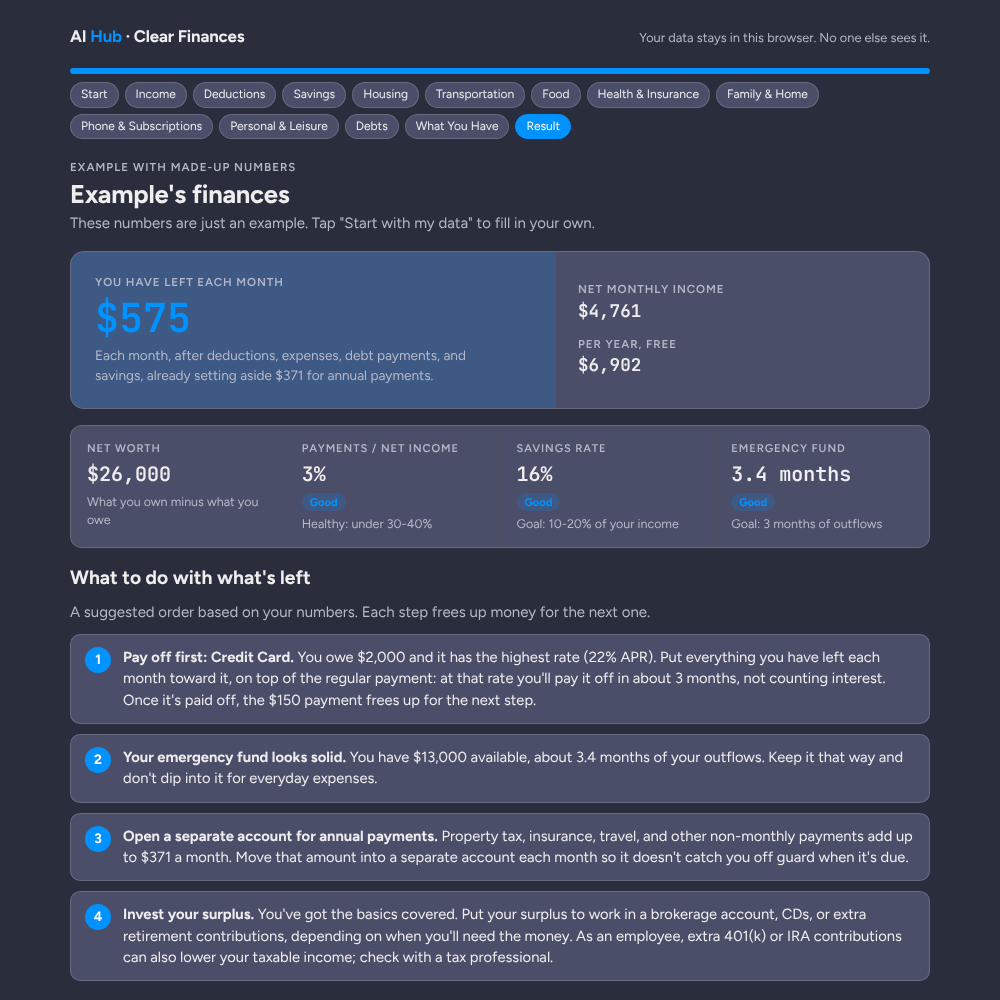
What you get. How much you have left each month, four traffic-light indicators (debt payments vs. income, savings rate, emergency fund and net worth), a step-by-step plan for your surplus, your income statement and your balance sheet. For example, if you carry a credit card at 28% a year, the plan tells you to pay it off first and in how many months.
It has a "See an example" button with made-up numbers, and your data stays in your browser: nobody else sees it.


Example 2: Clear Finances for the US
Clear Finances (US) is the same assistant adapted to the United States, in English and in dollars. We didn't rewrite it from scratch: we asked the AI to adapt it to another country.


The result has the same structure: what's left each month, indicators, a plan for your surplus, income statement and balance sheet. That's the lesson: once you have a tool that works, taking it to another country, language or client is one more conversation with the AI, not another project.

Conclusion: Your next tool is one conversation away
For years, building your own software meant hiring someone or learning to code. That barrier is gone. What matters now is knowing your work well enough to explain it, and caring enough to review the result.
Try this: pick one task you repeated this week. Describe it to an AI in three sentences and ask it to build a tool for it.
Open AI Hub, try one of the two assistants and tap "See an example" to see a full result in a minute. If you like it, install it on your phone and fill in your own numbers. And stay tuned: there's already a spot reserved on AI Hub for the next tool.
Tell us what tool you would build first and what's holding you back. Want your team to learn how to build their own AI tools? Write to sqawarrior@gmail.com or call +57 300 2489892. We offer training and hands-on support.
The AI Hub tools are a guide to organize your finances, not financial or tax advice.
Sources